What you will learn
In ecommerce, an incorrect price, availability, size, shipping promise, compatibility claim, or review summary is not a minor SEO flaw. It is a customer-trust problem that can create returns, support load, merchant disapprovals, and regulatory risk.
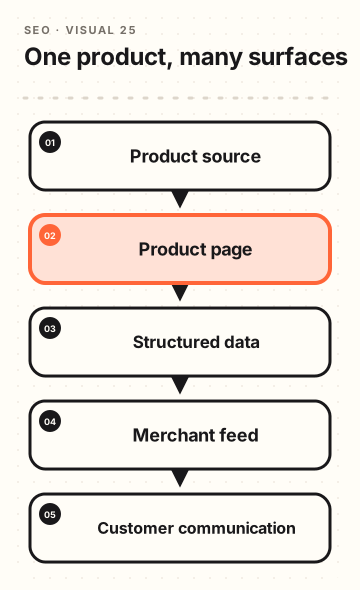
Product visibility becomes durable when the same source-of-truth facts flow reliably to every surface.
Why this matters
Search, shopping, ads, marketplaces, social catalogues, and AI systems may encounter product data through different pipelines. If the facts conflict, customers pay the cost through abandoned carts, complaints, and distrust.
A single truthful product record reduces the chance that a template or campaign repeats an outdated claim.
Good buying content adds context that a product feed cannot: fit, limitations, comparisons, care, delivery constraints, and real use cases. It should clarify facts, not invent benefits to make an item sound more searchable.
One product truth, many surfaces
Core concepts
Product truth model
A useful product record includes identity, variant relationships, manufacturer data, price, currency, availability, condition, images, dimensions, compatibility, regulatory claims, shipping rules, return conditions, and update ownership. Not every field belongs on every page, but every displayed field needs a source.
Use it when: Can you identify who owns this fact and when it was last verified?
Feed-page parity
Merchant feeds and product pages must agree on the facts a shopper will use to decide. A feed that reports in-stock while the page says backorder is not an SEO opportunity; it is a broken customer promise.
Use it when: Would a customer see the same price and availability after clicking from the feed?
Inventory states
In stock, low stock, pre-order, backorder, discontinued, temporarily unavailable, and replaced are different states with different customer expectations. Define the content, URL, feed, and support behavior for each one.
Use it when: Does the page explain what happens next for this exact inventory state?
Review and buying-content integrity
Reviews need attribution, moderation rules, and a way to distinguish verified-purchase signals from general feedback where relevant. Buying guides should cite source data, show material trade-offs, and be updated when products change.
Use it when: Can the business explain where a review or recommendation came from and why it remains current?
The practical method
- 01
Map data sources and owners
List PIM, ERP, warehouse, supplier, pricing, CMS, review, feed, and support systems. For each important field, name the authority, update trigger, service-level expectation, and fallback behavior.
- 02
Create product-state rules
Write clear treatment for active, pre-order, backorder, discontinued, out-of-stock, substitute, bundle, and recalled products. Include customer messaging, indexing, redirects, feed status, and support escalation.
- 03
Validate product-page rendering
Test price, currency, variants, availability, shipping, returns, reviews, images, and structured data on a representative set of templates. Check what users and crawlers receive, not just what the database contains.
- 04
Build feed parity checks
Compare feed values with live pages on a recurring sample. Alert on mismatched price, availability, identifiers, landing URLs, images, and shipping settings before a platform or customer finds the error.
- 05
Write buying content from verified facts
Use product specialists, support records, and approved source material to explain selection and use. Name limitations, compatibility constraints, and who should choose an alternative.
- 06
Close the feedback loop
Review returns, questions, review themes, feed errors, and product-search gaps. Fix the source data or customer explanation, then validate that downstream surfaces update.
Guided workshop
Synchronise product facts before shoppers discover a mismatch
This section turns the lesson into a bounded working session. It is designed to leave you with a shopper fact-sync checklist that aligns page content, structured data, feeds, checkout, inventory, reviews, shipping, returns, and update ownership.
Practice scenario
Practice scenario: A retailer sells a popular coffee machine. The product page shows a sale price, the product feed has the regular price, checkout applies a regional promotion, and the delivery estimate changes after a shopper enters a postal code.
Reviews refer to an older model number that still appears in the product data.
The team treats these as one customer-facts system. It chooses a representative set of products, follows each fact from its source to every place a shopper sees it, and identifies which differences are valid context versus a data error.
It records owners and review triggers instead of assigning all corrections to the SEO team.
The checklist protects more than visibility. It reduces surprise at checkout, support effort, and the risk of publishing product claims that no longer match the actual offer.
Build it step by step
Choose representative product states
Test normal stock, sale items, variants, bundles, regional availability, low stock, out of stock, discontinued items, reviews, and products with complex shipping or returns. Include the states that cause customer questions.
Make it tangible: Save a representative product set. It helps the team decide which data paths must be checked before a template release. Check testing only a simple in-stock product before moving forward.
Trace each shopper fact to its source
For price, availability, variant, delivery, returns, reviews, and specifications, name the authoritative system, update flow, visible placement, and owner. Note where context such as location changes the result.
Make it tangible: Save a fact-to-source map. It helps the team decide where a mismatch begins. Check treating the product page as the sole source of truth before moving forward.
Compare page, feed, markup, and checkout
Review the same product in the page HTML, rendered view, structured data, merchant feed, cart, checkout, email confirmation, and support record where relevant. Capture the exact condition for each value.
Make it tangible: Save a cross-surface comparison. It helps the team decide whether the shopper sees a consistent offer. Check checking only the most visible page value before moving forward.
Write clear conditional language
When price, delivery, availability, or eligibility depends on a market or choice, state that early and explain how the shopper can confirm it. Avoid hiding material conditions behind the final checkout step.
Make it tangible: Save a condition-and-confirmation note. It helps the team decide how to explain a valid difference without misleading people. Check using a single attractive number when it applies only sometimes before moving forward.
Set monitoring and correction triggers
Define what should trigger a review: feed failure, inventory change, pricing release, new promotion, regional expansion, review-provider change, product revision, or support complaint pattern.
Make it tangible: Save a product fact monitoring plan. It helps the team decide when a team needs to revalidate the product contract. Check waiting until a customer reports a contradiction before moving forward.
Fix the source before the symptom
When a mismatch appears, correct the responsible system or integration, then recheck every surface. Record the incident so future releases include the right automated or manual check.
Make it tangible: Save a correction record. It helps the team decide whether the full customer experience is repaired. Check editing one page while the feed or checkout stays wrong before moving forward.
Working template
Use these fields in a document, task, or spreadsheet. Keep the evidence close to the decision.
- Product state: Record the product, market, variant, inventory, promotion, and customer context under test. A merchandiser should be able to reproduce the same state.
- Shopper fact: List price, availability, shipping, returns, specification, review, or eligibility fact being checked. A support owner should recognise why the fact matters to a buyer.
- Source of truth: Name the system, owner, transformation, and expected update timing. An engineering owner should be able to trace the data path.
- Visible surfaces: Compare page, feed, markup, cart, checkout, confirmation, and support information. A reviewer should see every place a shopper could encounter the fact.
- Conditional explanation: State the valid conditions and how a shopper can confirm the final value. A customer should not need to discover a material condition by surprise.
- Correction trigger: Name the event, owner, and retest needed after a mismatch is found. The team should know how to prevent repeat drift.
Quality review before you ship
Use these checks while the evidence, owners, and customer context are still easy to correct.
- Choose one complex product and compare its facts across page, markup, feed, cart, checkout, confirmation, and support. Record the customer conditions under which a different value is legitimate, not merely unexpected.
- Ask the data owner how a correction moves through the system and how long it takes. A product fact cannot be called reliable if no one knows when the public surfaces will reflect a changed source.
- Treat checkout surprise as a defect report. If a material condition appears only after a customer has invested time, improve the earlier explanation or the product data path rather than blaming the customer.
Decision rules for the real world
The page and checkout show different prices
Do: Identify the context, source, and legal or commercial owner before changing copy.
Avoid: Do not display the lowest possible price as if it always applies.
A product is out of stock
Do: Show the state honestly and offer a useful next route when appropriate.
Avoid: Do not leave purchase controls active without a clear explanation.
Reviews refer to an older version
Do: Separate or label the versions and confirm the review provider's matching logic.
Avoid: Do not imply that a review describes a materially different product.
A feed update fails
Do: Restore or correct the authoritative data path, then revalidate representative products.
Avoid: Do not manually edit only the product pages to hide a system failure.
Coach notes
- Product data quality is customer experience work. It protects trust before a buyer reaches checkout.
- Conditions are not a weakness when they are explained early and honestly.
- A small representative product set is a practical regression test for every commerce release.
A cycling store prevents a costly availability mismatch
A cycling store's feed says a popular child trailer is available, while the warehouse has only a display model and the product page has a delayed nightly inventory update.
Customers arrive after seeing a shopping result, place orders, and receive cancellation emails. Review sentiment turns negative even though the product itself is excellent.
The store identifies the warehouse system as the availability authority, adds a near-real-time change event for sellable stock, distinguishes display-only from purchasable inventory, and writes a backorder state that states the expected lead time and cancellation option.
It also updates the buying guide to explain bike compatibility and required accessories, using manufacturer specifications reviewed by a product specialist.
Make it stronger
Version commercial claims
Price guarantees, sustainability claims, warranties, and performance statements change. Keep source documents, approval dates, market scope, and a retirement process so old copy does not survive in a template or cached campaign.
Avoid automated review distortion
Summaries can help shoppers scan feedback, but automated labels must not hide important negatives or imply a verified status that the system cannot support. Preserve access to the underlying reviews and moderation policy.
Handle discontinued products with intent
A discontinued product with ongoing search demand may need a truthful archive, a clear replacement, compatible parts, or support documentation. A homepage redirect often fails the customer's task.
Sample high-risk attributes more often
Availability, price, age eligibility, medical or safety claims, compatibility, and delivery dates can hurt customers quickly. Give them stronger monitoring than low-risk descriptive fields.
Current guidance
Keep one source of truth for every product fact
A shopper should see the same truthful offer on the product page, in checkout, in Merchant Center, and in structured data. When those sources disagree, the customer loses confidence and product listings can become unreliable.
- Keep price, currency, availability, condition, shipping promise, and sales information aligned across the landing page, checkout, structured data, and product feed.
- Show the actual price and availability clearly on the product page. A customer should not have to add an item to a cart or join a program just to discover a standard offer.
- Use a dependable update path from inventory and pricing systems into the page, feed, and schema. Automatic updates can help, but they do not replace routine data ownership and checks.
- Check Merchant Center separately for approval, visibility, and product-level issues. Approved data does not always mean a product is currently visible, and a visible product can still have a customer-experience problem.
- For sales, preorder, backorder, bundle, and regional pricing, write the customer-facing condition first. Then make the feed and structured data describe that same condition.
Use this before you publish
- A sampled product has matching price, currency, availability, and condition everywhere a customer sees it.
- A named owner can correct a feed or page mismatch quickly.
- The team checks Merchant Center health and customer checkout behavior after major catalog changes.
Current field note
Keep product facts aligned wherever a shopper sees them
Price, availability, shipping, returns, and variants can change quickly. The page, structured data, and product feed should be traceable to the same approved source of truth.
- Audit ten representative products for agreement across the page, checkout, feed, and markup.
- Put critical merchant product data in initial HTML where practical, especially when price or stock changes often.
- Monitor product reports after a template or feed change and fix the underlying source, not just the visible symptom.
Official reference: Google: Product structured data ↗
Lesson artifact
Shopper fact-sync checklist
Run a product-truth audit on ten representative SKUs.
Source: Name the authoritative system and owner for each critical fact.
State: Record current sellability, inventory, shipping, and replacement state.
Page check: Compare live product information with the source record.
Feed check: Compare price, availability, ID, image, and landing URL in the feed.
Buyer questions: List the missing information that support or reviews reveal.
Correction path: Assign fixes at the source and name the downstream validation test.
Before you move on
- Critical product facts have a named authority and update trigger.
- Page, structured data, feed, and customer communication agree on price and availability.
- Inventory states explain the customer's realistic next option.
- Review and buying content has clear provenance, moderation, and maintenance rules.
- High-risk attributes are sampled and monitored more often than decorative copy.
Put the lesson into practice.
Create a free Spacebrain account and use the SEO suite with your own data providers.